Prompting reduces obvious failures such as following direct “ignore previous instructions” commands, generating clearly disallowed content, or calling tools when the user did not ask for any action. But it cannot prevent unsafe actions once an agent can call tools or access real data. You cannot prompt your way into enforcement. Treat user input, retrieved context, and model output as untrusted, and put a deterministic control layer in front of every tool call that authorizes the action, limits blast radius, logs the decision, and quarantines or downgrades the agent when risk spikes.
What does “prompt-based safety” actually mean, and why do teams rely on it?
I keep seeing the same pattern in agent designs: teams invest heavily in prompt-based safety because it is fast, visible, and easy to iterate on. Then they connect the agent to real tools, real data, and real permissions, and they discover the hard truth: while prompts shape behavior, they do not control execution.
Once an agent can call tools and touch production systems, non-deterministic reasoning can trigger real side effects in external systems. That includes the wrong action, the wrong target, the wrong channel, unsafe sequencing, or excessive privileges. Without deterministic authorization along with blast-radius limits, containment, and auditability, these failures become incidents.
This is why I argue for a clear line: enforce safety at the action boundary, not in prompts that only steer the model’s reasoning and proposed tool calls. In this context, action boundary is specifically the tool-call boundary where execution can be deterministically allowed, denied, logged, and contained.
What is prompt-based safety?
When people say “prompt-based safety”, they usually mean some combination of:
System prompts and developer instructions that tell the model what to do and what not to do.
Templated guardrails and refusal prompts, often filtering model inputs and outputs using regexes and classifiers.
Self-critique or “judge” steps that ask the model to check its own work.
All of the control resides with the model. You may attempt to steer it away from bad behavior by giving it better instructions and catching bad inputs and outputs. That work matters but it doesn’t solve many classes of failures that show up in production agentic systems.
Why does prompt-based safety feel like it works early on?
Prompt-based safety looks effective early because the environment is forgiving. Demos are short-lived, low-permission, and designed to keep users on the “happy path” to quickly delivering an MVP, so the real risk stays invisible until you ship access to real tools and data.
At that point, the failure rate that seemed acceptable becomes irrelevant, because a single outlier can become a production incident. In other words, prompt guardrails look best when the agent has minimal authority, but the moment it can take actions, your threat model changes.
What prompt-based safety cannot guarantee
Prompt-based safety cannot replace execution-time controls, even if your APIs already have controls like authorization and auditing
Authorization at execution time: per tool call, with the right actor identity and delegated user context, not just “valid token.”
Containment: ability to quarantine or downgrade an agent session mid-run, not just return 403.
Auditability: trace proposed vs executed actions across steps with correlation IDs, not just endpoint logs.
Bounded worst-case outcomes: default blast-radius limits that assume the agent will sometimes be wrong, not just least privilege on paper.
If you want a clean mental model, treat prompt-based safety as a UX and quality layer. It can reduce obvious nonsense and discourage risky behavior, but it cannot enforce policy.
Where does prompt-based safety break down in practice?
Every new tool expands the set of real-world actions an agent can take, which increases both the attack surface and the potential impact.
With no tools, a model can be wrong in ways that waste time or confuse (or maybe offend) users. With tools, a model can be wrong in ways that:
Leak data
Change state
Notify the wrong people
Delete or overwrite records
Deploy code
Escalate privileges
Run up cost
Multi-step agents amplify small reasoning errors into incidents. Each step creates new context, new tool outputs, and new opportunities to drift off target.
This is why OWASP includes prompt injection as a top risk for LLM applications, but also lists related risks like insecure output handling and denial of service. Once tools are accessible to the agent, the risk stops being “bad text” and becomes uncontrolled execution, where a normal action runs in the wrong context, on the wrong resource, or with too much privilege.
How does RAG and untrusted context defeat prompt guardrails?
RAG and tool outputs turn your agent into a content consumer. Instructions can appear inside any ingested context including retrieved docs, emails, tickets, web pages, PDFs, and tool responses.
Its important to remember that a trusted user does not imply trusted content. OWASP’s prompt injection guidance explicitly calls out manipulation via inputs that alter behavior, including bypassing safety measures, and notes the close relationship between prompt injection and jailbreaking.
What does a real failure chain look like?
Here is the failure chain I want you to keep in your head when you evaluate “prompt safety” claims:
User submits a reasonable request
Agent retrieves internal context from a wiki, ticket, or email thread that contains adversarial or misleading instructions
Model plans a tool call that appears aligned to the user’s request, but is influenced by the misleading retrieved instructions.
Tool executes under a broad identity or weakly scoped permissions
Data is leaked, the wrong resource is modified, or a destructive action is taken
The team cannot quickly explain or contain the incident
Notice what did not need to happen. The user did not need to be malicious. The prompt did not need to contain the classic “ignore previous instructions” phrase. The model did not need to “break” in an obvious way.
A single plausible mistake becomes an incident when the system treats that mistake as an authorized action and executes it with privileged credentials and API scopes.
What failure modes emerge when teams rely on prompts for safety?
When prompts are the primary safety layer you’ll see the same runtime gaps show up.
The shared service account anti-pattern
When teams rely on prompts for safety, tool integration often optimizes for convenience. The fastest path is usually a shared credential or a broad service account that “just works” across tools and environments.
Prompts do not cause that choice, but prompt-first builds tend to prioritize speed, and shared credentials remove friction. The problem is blast radius. Once the agent runs under a broad identity, any plausible but wrong tool call executes with the full power of that account.
Coarse permissions that do not map to specific operations
Coarse access sounds like “the agent can use Salesforce” or “the agent can access the data warehouse.”
Real safety needs “the agent can execute this operation on this resource under these conditions.” If you cannot express that, you cannot enforce least privilege access controls.
Authorization-by-prompt
This is the pattern where you write “Only access what you need” and “Never do X” and assume the model will comply.
The model will get things wrong sometimes. Your system still needs to prevent damage when it does.
Blurred boundaries between user intent, agent intent, and system authority
If you cannot answer “who is acting” and “whose authority is this,” you will struggle to implement agent authorization correctly.
Common warning signs include:
One service account acts for all users.
No per-user delegation.
No explicit separation between user request, agent plan, and executed action, so model interpretation is treated as authorization.
Keyword filtering that blocks obvious strings but misses indirect attacks
Regexes catch the low-effort “ignore previous instructions” prompt. They do not catch oblique attempts, encoded instructions, or tool outputs that steer the model.
OWASP explicitly includes prompt injection as a risk and describes how crafted prompts can lead to unintended consequences like data leakage or unauthorized access.
What are common incident patterns when teams rely on prompts for safety?
The patterns below happen even when prompts look correct, because prompts do not enforce behavior.
Resource scoping failures: The agent executes a valid action against the wrong tenant, customer, or environment because the tool boundary did not enforce resource-level constraints. This failure often looks like a “tool misconfiguration” until you see it as an inevitable result of natural language ambiguity. Humans say “update the account” and mean one thing. The agent picks the wrong account ID and your system happily executes.
Unsafe sequencing where each step is allowed but the chain causes harm: For example, an agent can be allowed to query billing data, export it to a CSV for analysis, and post files to Slack. However the chain becomes a data leak when it posts that CSV into a broad channel that includes people who should not have access to the data. Each step looks fine in isolation. The sequence violates policy.
Data leakage through allowed channels: Slack, email, tickets, logs, analytics dashboards, and reports are all “tools.” If you let agents write to them without policy, you have built an exfiltration path with a friendly UI.
Weak forensic visibility after incidents: If you cannot reconstruct who requested the action, what the agent proposed, what the system allowed or denied, what data was touched, or why it was allowed, then your incident response becomes guesswork.
Silent policy drift as prompts evolve and models change: Prompts change across versions and teams, and underlying models change too. If your “policy” lives in prompt templates, it will drift.
What are the requirements for secure agents beyond prompt-based safety?
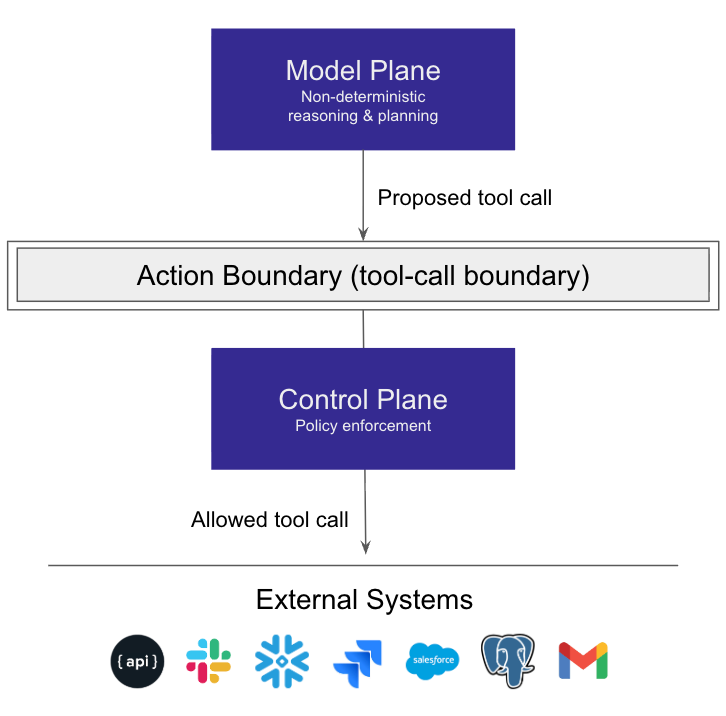
Firstly, teams should reframe safety around enforceable actions rather than prompting instructions to the model. The best framing I’ve seen is to separate your system into two planes: the model plane and the control plane.
What is the model plane?
The model plane handles:
Non-deterministic reasoning.
Planning and proposing actions, including proposed tool calls.
Summarizing, classifying, extracting, and ranking.
The model plane’s inputs include user requests, retrieved context, and prior outputs. Because it is non-deterministic, you must treat it as untrusted for enforcement.
What is the control plane?
The control plane handles:
Deterministic authorization
Enforcement
Logging
Containment and circuit breakers
This plane evaluates every proposed action at the tool-call boundary where execution can be allowed, denied, logged, and contained.
Figure 1: Prompts steer the model’s reasoning and proposed tool calls. The control plane governs execution at the tool-call boundary.
The model suggests. The control plane enforces.
What do you need to define for each agent before you give it tool access?
There are a set of core questions you should pose for each agent. Ask your system designers and tool owners which real-world actions will our agent be able to execute, on which resources, under what conditions, and with what blast radius if it is wrong?
That translates into concrete follow-ups:
Who is acting? Who is the requester, and what execution identity will the tool call use? Is the agent delegated to act for this user, and within what scope?
What action is it? Read, write, delete, send, deploy, refund.
What resource is targeted? Tenant, customer, dataset, repo, channel, environment.
Under what conditions? Time window, ticket ID, approvals, risk signals, rate limits.
What is the worst-case impact? Data exposed, state changed, cost incurred, systems affected.
Once you can answer those questions, you need one place to enforce them consistently. That means every proposed tool call must flow through a centralized policy enforcement point at the tool-call boundary. This is where the system can deterministically allow or deny the call, log the decision, and trigger containment when needed. Engineers often implement it as a gateway, middleware, or shared SDK that sits between the agent runtime and your tool integrations.
What does policy enforcement look like in practice?
You need to define the following.
Action-level controls per tool and operation: Tool access control must be granular. “Can use Slack” is meaningless. You need “can post to these channels,” “can upload files only to these channels,” “can mention external users never,” and so on.
Least privilege: Scope to the specific task at hand, constrained to the right tenant or customer and the right environment, with time limits and approvals when the action is higher risk.
Trust boundaries for retrieved content and model output: Treat retrieved text and the model’s reasoning as untrusted inputs. Use them to propose actions, but never to grant access. Authorization must be decided from identity, policy, resource scope, and execution-time context.
Deterministic enforcement at the action boundary: The system must enforce policy at the tool-call boundary in a way the model cannot override with language.
Auditability: You need a consistent record of who made the request, what ran, what data was touched, and why it was allowed
What safe defaults and blast-radius limits should you implement?
For your agent to be useful, you can’t limit all its actions. However in the early days of release, consider the following:
Default deny tool execution: Tools can be connected, but every tool call is denied unless explicitly allowed by policy for that operation, resource, and context.
Read-only by default
Scoped credentials instead of shared keys
Quotas and rate limits
Step-up approvals for destructive operations
Sandboxing and environment separation
Bounded session and tool-call limits
OWASP’s top risks for LLM applications include issues that map directly to these controls, such as prompt injection and insecure output handling. The practical implication is that you need boundary controls, not just better prompts.
Why should you assume failure and optimize for containment time?
Because your agent will fail, the question is whether it fails safely. Containment controls should include:
Circuit breakers on anomalies.
Quarantines for suspicious sessions.
Automatic downgrades to read-only.
Human approval fallbacks for high-risk actions.
This is where the control plane earns its keep. It gives you operational levers that prompts never will.
How can teams move from prompt guardrails to enforceable safety?
I like checklists because they force action. Here is the practical checklist I would use.
1) Inventory high-risk actions
List the actions that could create real damage:
Data export
Admin changes
Messaging and file sharing
Deploys and configuration changes
Payments, refunds, or order submissions.
If you cannot name the actions, you cannot control them.
2) Define actor identities clearly
At a bare minimum, define:
User identity
Agent identity
Service account identity
Delegation paths (who the agent can act on behalf of)
Make it explicit when the agent acts on behalf of a user and when it acts as a system process.
3) Enforce policy at execution time
Put one decision point in front of every tool call, and enforce policy there every time. That’s the moment agent authorization stops being a theory exercise and becomes real code running in production.
4) Log every decision
Log allow and deny decisions with:
actor identity
action
resource
context
policy rule matched
correlation IDs to tool calls
Do this and you will save a lot of pain during incidents.
5) Limit blast radius by default
Use scoped credentials, start in read-only mode, and add quotas and rate limits so a single mistake can’t turn into a major incident. For a brand new agentic workflow, ship read-only first, then expand permissions only after you’ve shown it behaves safely.
6) Add containment controls
The controls should be implemented up front. They include kill switches, quarantines, permission downgrades, and approval paths for higher-risk actions. This is not optional polish. It’s how you stop a bad run quickly when the model does something unexpected.
7) Continuously validate
Run adversarial simulations and regression tests against real toolchains. If you only test prompts, you will miss the failures that matter.
How do teams close the gap between safe demos and safe production?
You won’t solve agent safety with better prompts because prompts don’t enforce anything at execution time. The durable control surface is action governance at the tool-call boundary, where you can deterministically allow, deny, and contain. Safety also isn’t static, so you need to re-validate as prompts, tools, models, and workflows evolve.
Production readiness means repeatedly proving you can avoid worst-case outcomes, before launch and continuously after deployment.
Where does Oso for Agents fit?
These are the requirements Oso for Agents addresses. Oso enforces policy on every tool call with least-privilege, resource-scoped authorization, logs each decision for forensics, and provides containment controls when behavior looks risky.
Under the hood, that enforcement maps cleanly to the model plane vs control plane split:
Your agent can still plan freely.
Oso evaluates whether the plan can execute.
If policy denies, the tool call does not happen.
If policy allows, execution proceeds with the right scope and you log the decision.
Why are system prompts not enough once an agent can call tools?
Because prompts influence what the model proposes, not what your system executes. Once tools exist, you need deterministic controls at the tool-call boundary to prevent unsafe actions even when the model proposes them.
What is the difference between guardrails and authorization?
Guardrails steer behavior and reduce obvious failures. Authorization enforces who can do what on which resources under which conditions. Guardrails live in the model plane. Authorization must live in the control plane.
What does least privilege look like for agents in practice?
It means you scope permissions to the task, tenant, and environment, start read-only by default, and require step-up approvals for destructive operations. It also means you use scoped credentials rather than shared keys.
How do you quarantine an agent session without taking the whole system down?
You implement containment in the control plane: flip the agent into read-only, disable specific tools, throttle tool calls, and block high-risk actions while allowing low-risk reads to continue.
What should you log for agent tool calls to support incident response?
Log actor identity, action, resource, context, allow or deny, the policy rule matched, and correlation IDs that connect the decision to the tool call and downstream system logs. Without this, you cannot answer “what happened” fast enough.
How do you prevent safe individual actions from becoming unsafe sequences?
You add workflow-aware constraints at execution time. Allow the read. Allow the export only to approved storage. Deny the “send” step when it would transmit an exported artifact to an unapproved channel, unless the request includes explicit approval context.
About the author
Mat Keep
Product Marketer
Mat Keep is a product strategist with three decades of experience in developer tools and enterprise data infrastructure. He has held senior product roles at leading relational and NoSQL database vendors along with data engineering and AIOps providers. Today, he works as an independent advisor helping technology companies navigate the transformative impact of AI. At Oso, he focuses on how secure, scalable authorization can accelerate AI adoption.
Level up your authorization knowledge
Secure Your Agents
Authorization, monitoring, alerting, and access throttling.